Bravura
A concept app that connects people with verified experts in health, finance, technology, and personal development, redesigned around the one thing testers didn’t have: trust.
ROLE
Solo Designer: Research, UX, UI, Prototyping, Usability Testing
TIMELINE
January-October 2025 (CareerFoundry project)
TOOLS
Figma, FigJam, Miro, Lyssna, UXtweak
PLATFORM
Mobile and desktop
Overview
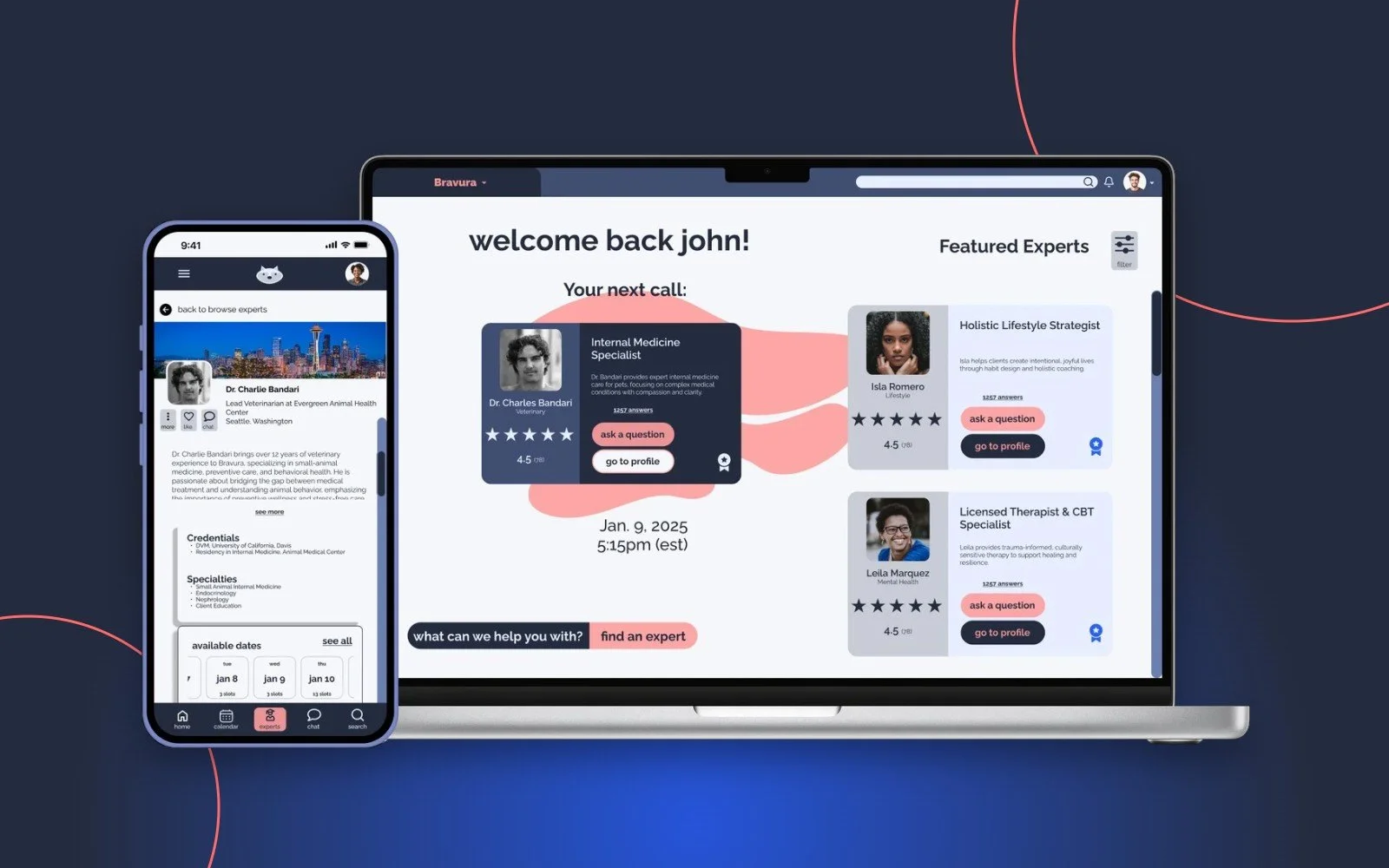
Bravura is a concept app that connects people with verified experts. I designed it end to end for mobile and desktop, tested it with 6 people, and redesigned it around what they told me: they didn’t trust the experts.
The problem:
People want fast, reliable advice, but existing platforms either hide their fees or can’t prove their experts are qualified.
What I did:
Research, information architecture, wireframes, a design system, and a clickable prototype on two platforms.
What testing changed:
All 6 testers were unsure whether experts were actually vetted. Verification became the center of the redesign.
The Problem
When people need advice on their health, money, or career, they have two bad options. Free forums are fast but full of unverified answers. Paid services feel credible but often bury their fees and make cancelling hard.
How might we give people fast access to experts they can actually trust, with no surprises about cost?
What research showed
I started with a competitive analysis of two platforms people already use for advice. Both failed on the same thing: trust.
JustAnswer
Paid answers from real professionals.
What works: Real professionals and a clear paid model
Where it loses trust: Unclear pricing, hidden fees, and a hard-to-find cancellation flow.
Quora
Free answers from anyone.
What works: It is free, with a huge range of topics.
Where it loses trust: No way to verify who’s answering or whether they’re right.
Bravura needed JustAnswer’s real experts without the surprise costs, and Quora’s openness with proof of who’s answering.
What people told me
I ran in-person interviews about how people look for advice online, then grouped their answers in an affinity map in Miro. Four needs came up again and again:
Proof of expertise. People wanted credentials verified, not just listed.
Clear costs up front. No subscriptions or add-on fees discovered later.
Ongoing relationships. People wanted to return to the same expert, not start over each time.
Choice of format. Chat, video, and phone, depending on the question.
Proof of expertise and clear costs shaped the biggest decisions below.
Key design decisions
Each decision below answers what research and testing told me about trust.
1. Show the price before the commitment
JustAnswer’s biggest complaint was surprise charges. In Bravura, every expert card shows the price, and the subscription flow compares plans side by side before payment.
2. Make the dashboard about one action
My first dashboard tried to show everything. In mid-fidelity I cut it down to help people do the main job: find an expert and ask a question. A card-sorting exercise also showed people expected search, so I added it to the navigation.
3. Use color to signal calm and competence
I chose a medium blue and a near-black navy to read as trustworthy and secure, with a coral accent for actions. After peer review flagged contrast problems, I adjusted the palette to meet accessibility standards.
4. Lead with one clear action, and say why to trust it
I A/B tested two welcome screens in Lyssna. Version A offered three equal buttons: ask a question, browse categories, and view recent topics. Version B gave one main action, “ask an expert,” plus three short lines on what you get, including “connect with a verified expert.” Version B won. One clear path, with the trust promise stated up front, beat a menu of choices.
Usability testing: what broke and what I changed
Couldn’t tell whether experts were vetted (6 of 6 testers, severity 4): Added a credentials section to every expert profile and a badge on featured experts.
“Ask a question” was hard to find (3 of 6, severity 3): Added a “What can we help you with today?” prompt and “ask a question” buttons to the dashboard.
Profiles didn’t show availability (3 of 6, severity 3): Added available dates and open time slots to expert profiles.
Payment plans didn’t say what was included (2 of 6, severity 3): Added bullet-point descriptions under each plan, shown side by side.
Icons were unclear without labels (3 of 6, severity 2): Added text labels to the nav bar and category icons.
The dashboard felt overwhelming at first (2 of 6, severity 2): Split sign-up into steps with a progress indicator.
I ran moderated sessions with 6 people aged 25–45, in person and over Zoom, and asked them to sign up, browse experts, contact one, and set up payment. I rated each problem by severity (1–4) and fixed the most serious first.
“I want to see credentials verified and not just listed.” — Test participant
“Too many clicks just to find a vet. If this was an emergency I would be panicking.” — Test participant
Final design
Design 2.0 carries the user from sign-up to a booked session with a verified expert, on mobile and desktop.
List:
Find: Browse experts by category, with price and credentials on every card.
Check: Open a profile to see verified credentials, reviews, and open time slots.
Book: Pick a time and a format: chat, video, or phone.
Confirm: See the session details and the cost before anything is charged.
Outcome and what’s next
Bravura is a clickable prototype on mobile and desktop, redesigned after testing to put verification and pricing where people make decisions.
List
Retest the redesign. Run a second round with new participants to confirm the verification badges actually fix the trust problem.
Measure, not just observe. Time how long it takes to find and contact an expert, before and after the changes.
Show response time on expert cards. Testers wanted to know how fast an expert replies before they reach out. Profiles now show availability, but the cards people browse still don’t.
Design the emergency path. One tester said they’d panic if they needed help fast. A quick-help flow that skips browsing is the biggest gap left.
What I took away. Trust isn’t one feature. It comes from small, visible details, like a badge, a price, or a response time, showing up exactly where people make decisions.