Pocket Bartender
A mobile cocktail app that teaches beginners and supports working bartenders through service, designed by someone who has done both.
ROLE
Solo Designer: Research, UX, UI, Prototyping
TIMELINE
2 months, finished October 2026
TOOLS
Figma: variables, components, interactive prototype. Claude (Anthropic): AI collaborator
PLATFORM
iOS concept app
Overview
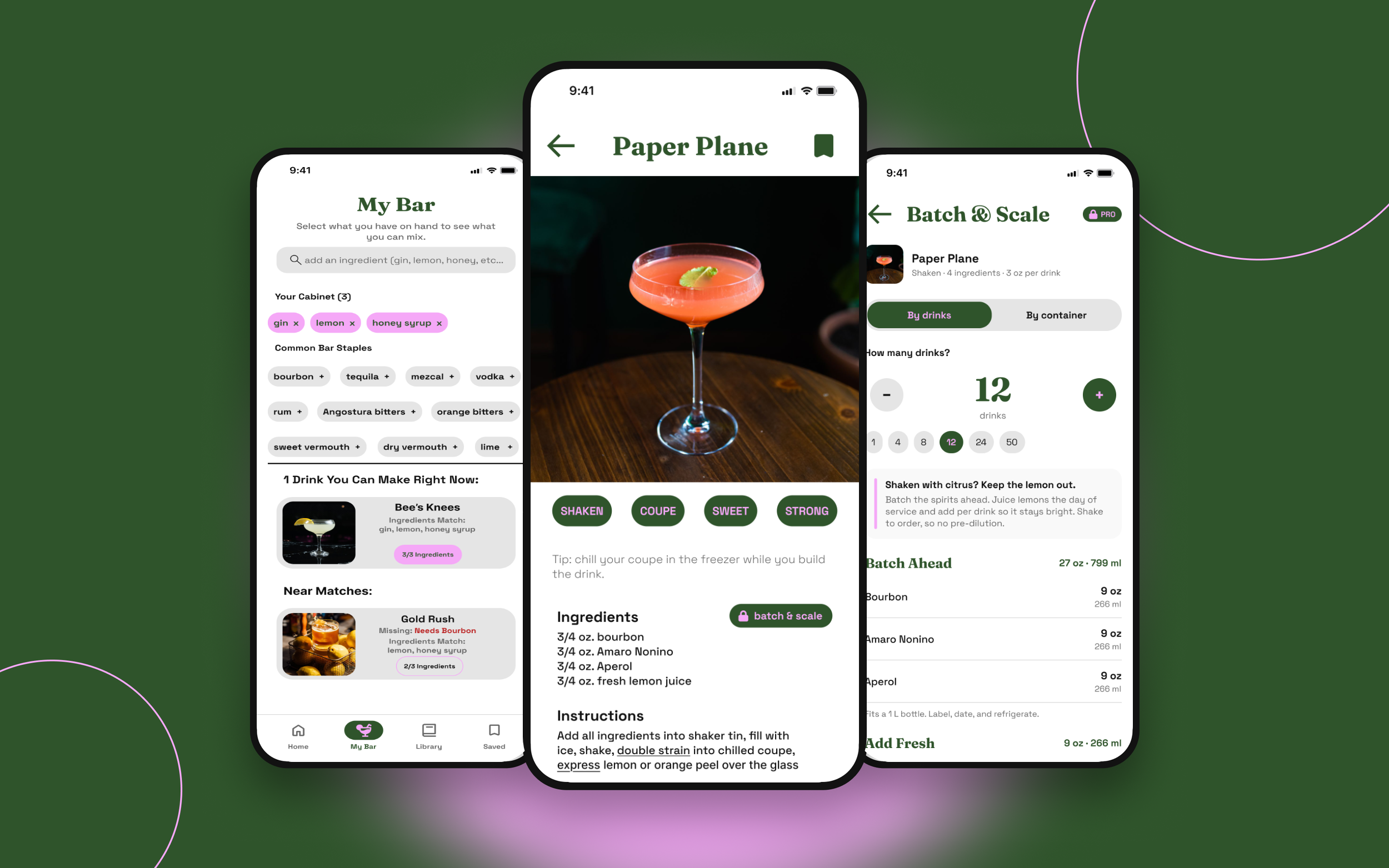
After 20+ years running bars and beverage programs, I designed the cocktail app I wanted for my staff and my friends. Most recipe apps are digital cookbooks. Pocket Bartender starts from what you have, teaches technique as you go, and scales a recipe for a full service.
The result is a 30+ screen interactive prototype built on a variable-based design system. Five decisions shaped it:
My Bar shows what you can make right now from the bottles you own.
Tappable technique terms link words like “express” and “double strain” to a glossary.
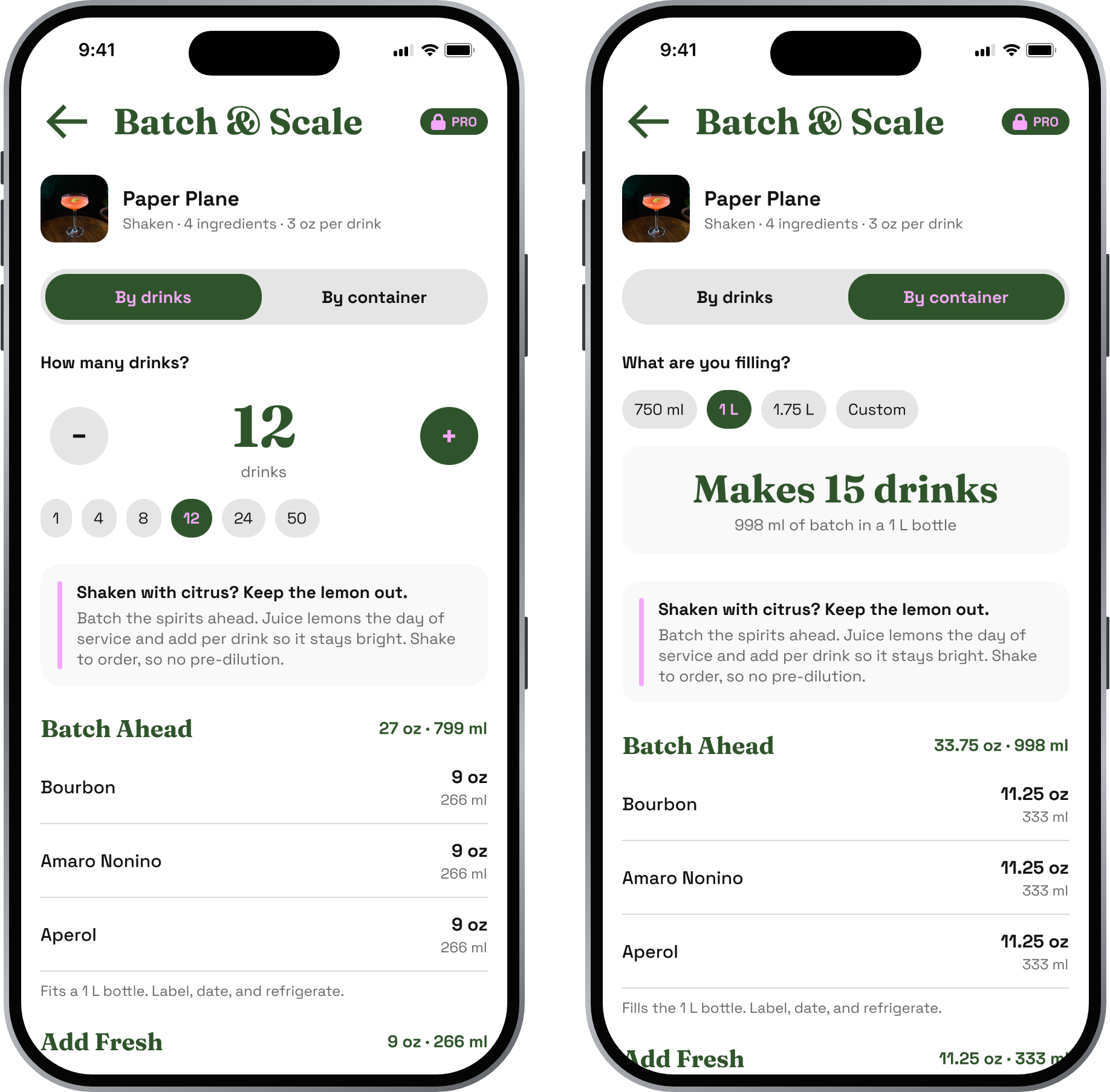
Batch & Scale turns one recipe into a prep spec for 12 drinks or a 1 L bottle.
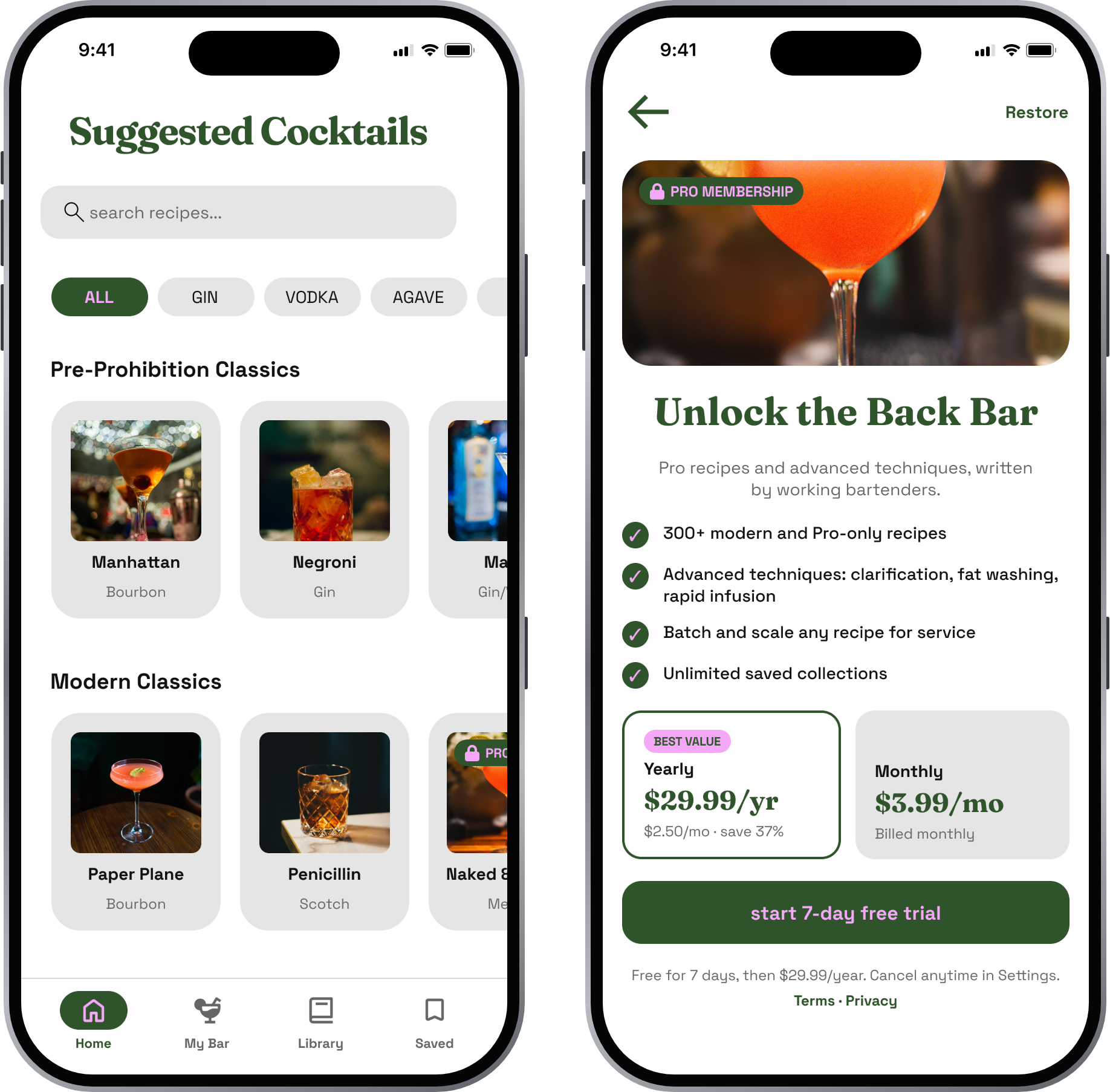
Free vs. Pro keeps locked recipes visible and sells the tools pros need.
An accessible palette: one variable change fixed failing contrast across every screen.
The Problem
Recipe apps assume you already know how to bartend, and they ignore what's in your cabinet.
I've trained bartenders who started without any knowledge of the craft. They didn't know how to shake, stir, or read a jigger. On the same shifts, I was teaching new hires how alcohol's chemistry makes infusions and fat washing possible, all while making oleo saccharum, falernum, and orgeat from scratch. Most cocktail apps serve neither end of that range. They assume you already know the basics, and they never explain the advanced stuff.
Behind the bar and at home, I kept seeing the same three gaps:
Jargon without help. Specs say “dry shake” or “express” and never explain them.
Recipes you can't make. You find a drink, then learn you're missing two ingredients.
No path from one drink to forty. Scaling a spec for a party or a shift means math on a napkin, and easy mistakes like batching fresh citrus.
How might we help someone make a great drink with what they have, whether it's their first cocktail or their four-hundredth of the night?
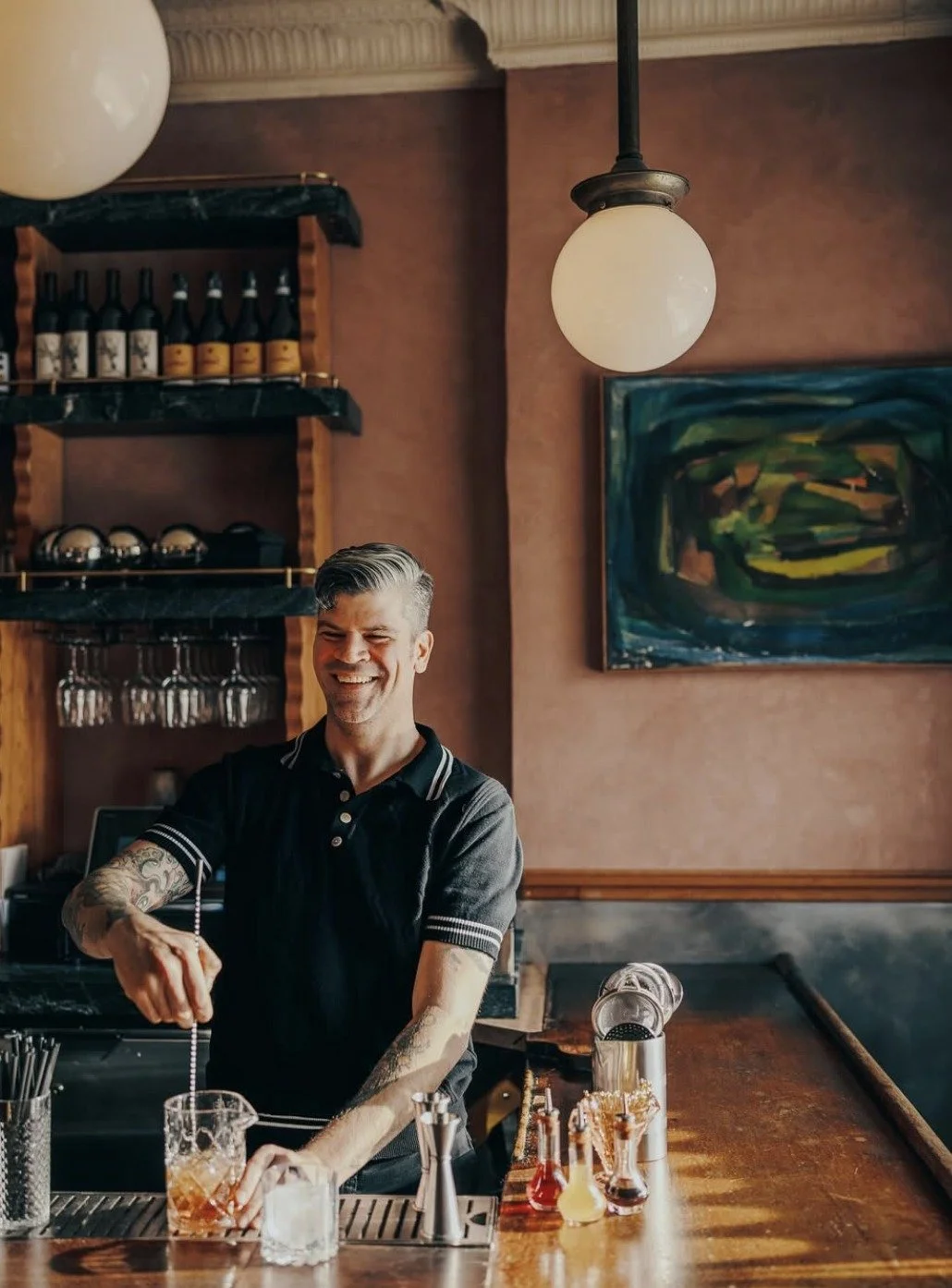
photo by Josh GolemanWho it’s for
Two people use the same recipe in very different ways, so the app has to serve both without splitting in two.
The home learner
Mixes for themselves and friends on weekends.
Goal: Make something impressive without wasting bottles.
Frustration: Doesn’t know the techniques or the terms.
What helps: My Bar, tappable technique terms, onboarding tips. (Free)
The working bartender
Works a bar or events team, often under time pressure.
Goal: Keep specs consistent and prep fast for service.
Frustration: Scales recipes by hand; new staff miss steps.
What helps: Batch & Scale, prep lists, Pro recipes. (Pro)
These are proto-personas drawn from 20+ years of training bartenders and making drinks for guests.
What I knew going in
I didn't run formal research for this project. I designed from two decades of training bartenders, building cocktail programs, and serving guests. Three lessons from that time shaped the app:
Beginners stall on technique, not ratios. The new hires I trained could follow a spec on paper. What stopped them was the doing: how to shake, how to stir, how to measure with a jigger.
People start from what they have, not from a recipe. Whether it's a home cabinet or a bar's back shelf, the real question is what you can make with what's in front of you.
Pros want speed and consistency over inspiration. In the middle of service, a bartender needs the right spec immediately, made the same way every time.
Each insight maps to a decision below: tappable terms, My Bar, and Batch & Scale.
Key design decisions
Each decision below came from something I saw behind the bar.
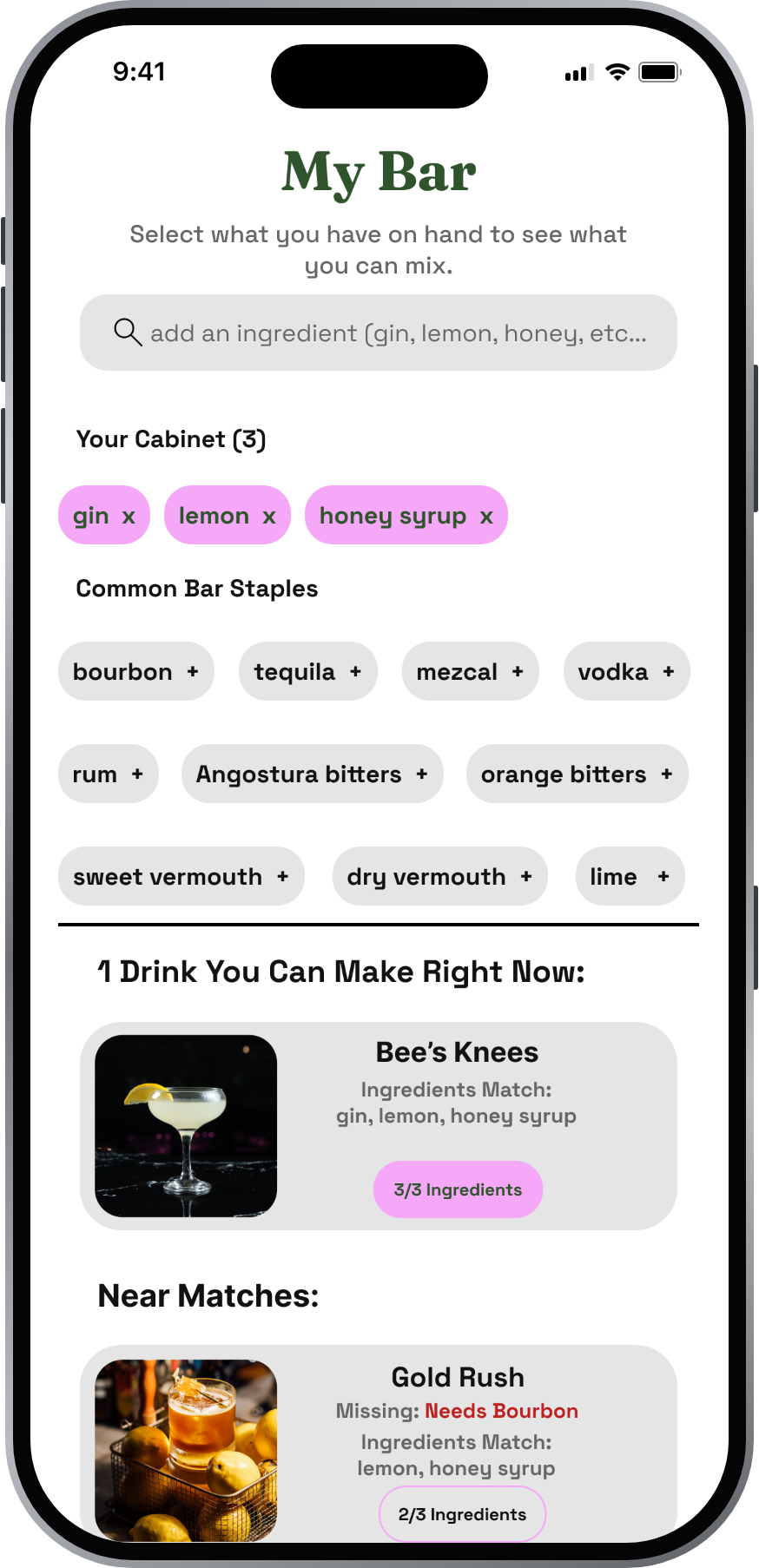
1. Start from the cabinet, not the recipe
My Bar asks what you have, then sorts drinks into “you can make this now” and “near matches.” A near match names exactly what's missing, so “Gold Rush: needs bourbon” becomes a shopping list, not a dead end. Onboarding seeds My Bar on the first launch, so the first real screen is already personal.
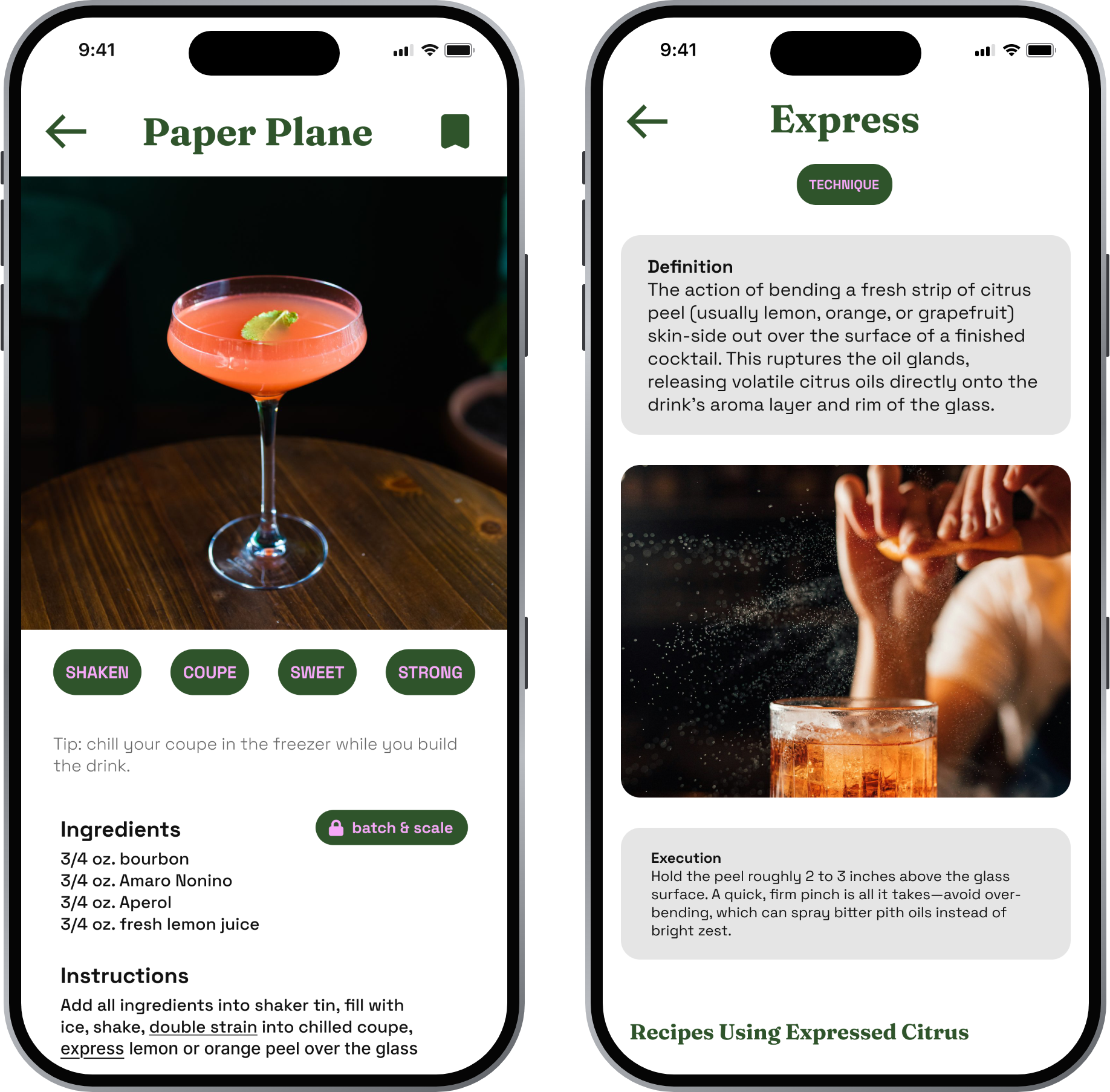
2. Teach technique inside the recipe
Technique words in the instructions are tappable and open a glossary entry. The Express entry explains the move, shows it on video, and warns that over-bending the peel sprays bitter pith oil. I also moved each drink's history below the ingredients and steps. Someone holding a shaker needs the spec first; the story can wait.
3. Batch & Scale: built from service experience
This is the feature only a bar manager would design. Pick a drink count or a bottle size, and the app returns a prep spec in ounces and milliliters. It also applies a rule every good bar follows: citrus never goes in the batch. For a Paper Plane, it batches the bourbon, Amaro Nonino, and Aperol ahead, then lists lemon juice as “add fresh,” with a lemon count. Twelve drinks become 27 oz of batch, about 9 lemons, and a per-drink pour of 2.25 oz batch plus 0.75 oz lemon.
4. Free vs. Pro without hiding the good stuff
Free users still see Pro recipes, marked with a small lock badge. Hiding them would make the free app feel thin; showing them shows what's possible. The upgrade screen sells concrete tools, like batching and advanced techniques, and leads with a yearly plan and a 7-day trial.
5. Let users grow the glossary
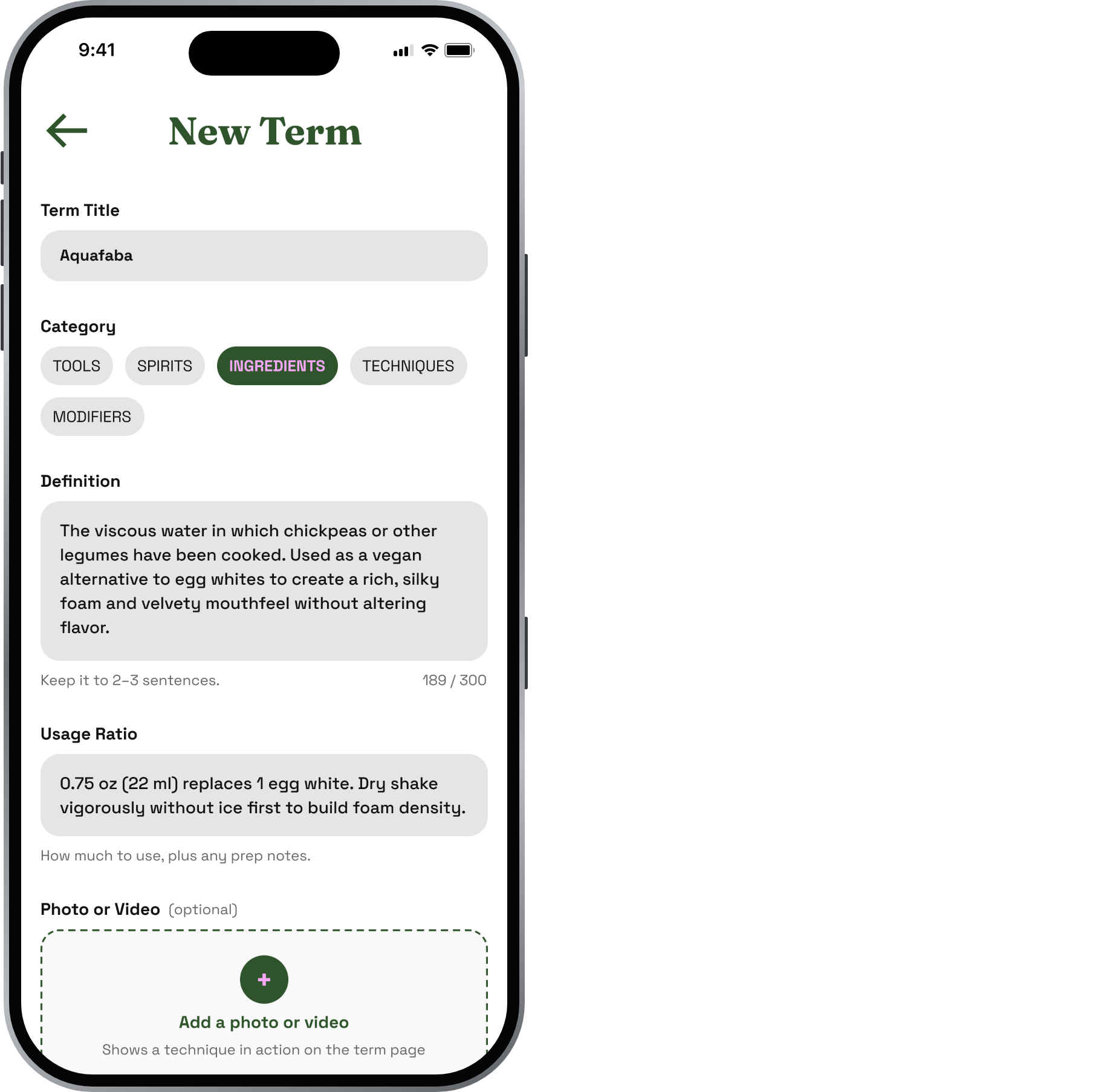
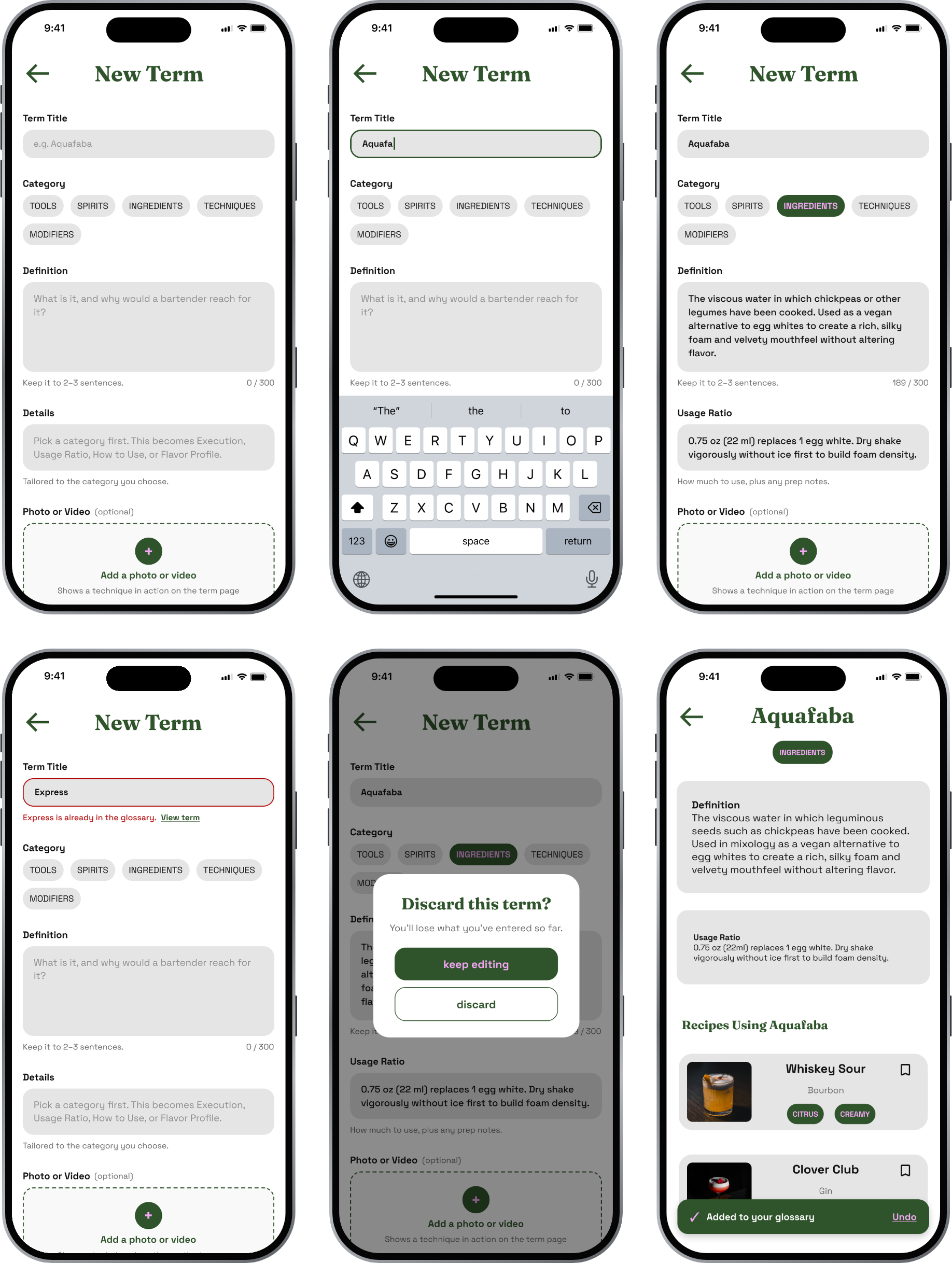
Bartenders have house terms, so users can add their own. The form adapts to the category. A technique asks for “Execution,” an ingredient asks for “Usage Ratio,” a tool asks for “How to Use.” The same form produces entries that match the glossary's structure.
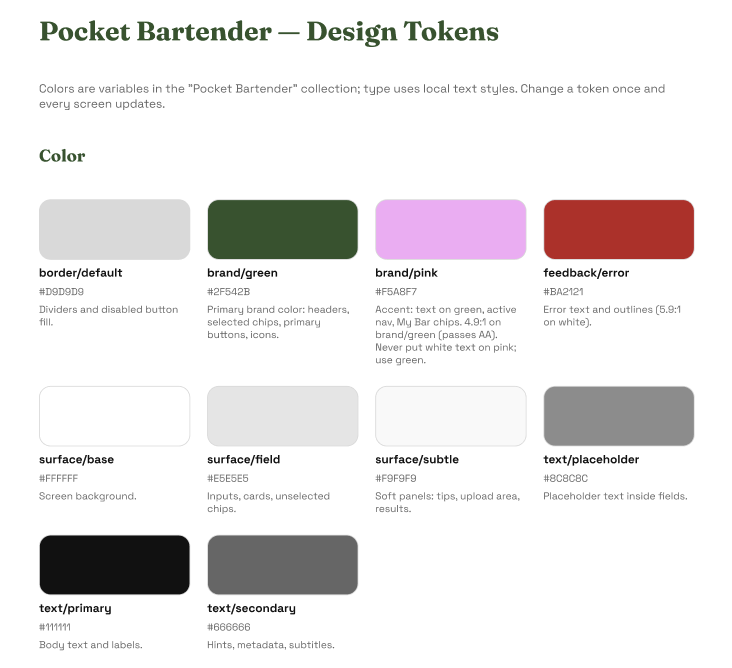
The app runs on 10 color variables, 12 text styles, and a small component library, so one change updates every screen.
Type: Fraunces, a soft serif with some swagger, for screen titles; Space Grotesk for everything you read and tap.
Color: deep bar-top green as the brand, a pink accent, and neutral surfaces. Every color is a named variable, such as brand/green or text/secondary.
Components: Button (Primary, Accent, Text Link), Chip (Default, Selected), the Recipes/Glossary toggle, a labeled Nav Bar, and a lock icon for Pro content.
Design system and accessibility
The contrast fix. An audit showed my pink-on-green labels measured 3.8:1, under the 4.5:1 that WCAG AA requires for small text. Because pink was a variable, I lightened it once (#ED86F1 to #F5A8F7) and every chip, tab, and button passed at 4.9:1. I then set a rule: pink text sits on green, green text sits on pink, and white never sits on pink.
Designing the in-between moments
Real products are mostly edge cases, so I designed the states around each flow, not just the main screen.
Nothing filled in yet: Save stays disabled until the title, category, and definition are filled.
A term that already exists: An inline error says “Express is already in the glossary” and links to it.
Leaving with unsaved changes: “Discard this term?” appears, with Keep editing as the main action.
Term saved: You land on the new entry, with an “Added to your glossary” toast and Undo.
Nothing saved yet: A short explanation and a “Browse recipes” button.
Search finds nothing: Related drinks, plus an option to add it as a custom recipe.
Unsaving a cocktail: A confirmation with clear verbs: Unsave or Keep.
Iteration
I haven’t tested the prototype with users yet. These changes came from my own design reviews and an accessibility audit.
What changed between versions:
Recipe page: history moved from the top to below the steps, so the spec is visible without scrolling.
Navigation: shadowed icon tiles became a flat, labeled tab bar with a clear active state.
Accent color: lightened to pass contrast, and white text on pink removed.
Naming: one tab, “Library,” with a Recipes/Glossary toggle, instead of two competing names.
Next: testing. I'll put the prototype in front of five people, a mix of working bartenders and home drinkers, with three tasks: find a drink from what's in the cabinet, learn how to express a peel, and prep Paper Planes for 12. Where they hesitate will drive the next version.
Outcome and what’s next
Pocket Bartender is a 30+ screen clickable prototype that runs from first launch to a batched spec for service.
What I'd build next
Pour cost on Batch & Scale, using bottle prices. Every bar manager tracks this by hand today.
Dark mode. The color variables make it a second mode, not a redesign.
Shared house specs, so a bar team works from one source of truth.
What I took away. Tending bar is fast and stressful, especially with a full rail and demanding guests. I wanted a quick reference a bartender could use mid-shift: look up a spec, add their own, or learn a new one from the app's library. I also wanted new bartenders to understand the jargon and how to actually execute each technique. Designing for that pressure meant cutting anything that slows someone down, which is why every recipe puts the spec before the story.
How I worked with AI. I built Pocket Bartender with Claude, Anthropic’s AI assistant, as a collaborator. The product decisions, feature ideas, and design direction are mine, drawn from 20+ years behind the bar. Claude helped me move faster: wiring and cleaning up the prototype flows, organizing the screens into a component library, producing the mockup images, and editing this write-up. I reviewed every change and made the final calls.Image credits. Photo of me behind the bar: Josh Goleman. Cocktail photography via Unsplash and Pexels, used under their free licenses: Arina Krasnikova, dextarstudio, and eddieo (Pexels); Ambitious Studio / Rick Barrett, CHUTTERSNAP, Martina Alpeza, Janesca, Tomi Saputra, Paul Esch-Laurent, Wesley Sanchez, Daniel Lloyd Blunk-Fernández, Poul Hoang, and Caramel (Unsplash).